Your Docker Swarm, from one window. Every node in view.
A Windows desktop app for running a swarm from day to day. Deploy services and roll them back, follow the logs of every service and see what changed in the swarm, take a node out for maintenance, back up the swarm and its volumes, and hear about it when something breaks. It keeps itself up to date.
Version 1.8.0 · Release notes · Source on Codeberg · The installer is not signed yet, so SmartScreen asks once: More info → Run anyway.
Installs nothing on the swarm Talks to the Docker Engine API through your contexts Windows 10 and 11, and it updates itself from Codeberg
docker service ps- Go
- Wails v3
- Svelte 5
- SVAR Svelte
- docker-api-go
- Docker Swarm
- Docker contexts
- Docker in WSL
- Docker over SSH
- TCP and TLS
- Docker Desktop
Principles
Every node, not only the one you are on.
docker stats, docker ps and docker volume ls only see the daemon you are connected to. The app reaches every node through its own Docker context: the load of the whole swarm, a shell on any node, and a volume backed up on the node where it lives.
See what a change will do before it does it.
Drain shows what moves, what stops and what cannot run anywhere else. Promote and demote warn about the quorum. Removing services lists what would be left behind, and a restore lists what it will create.
Installs nothing on your nodes.
It connects through your Docker CLI contexts and talks to the Engine API directly. The only things it starts on the swarm are short-lived helper containers, for the Terminal and for volume backups.
Made for whoever looks after the swarm.
A few VPSs or servers, managed from a Windows machine. Two kinds of people end up doing that.
Your own sites, APIs and workers on a small swarm.
Deploy from a compose file, roll out a new image, and read the logs of every replica when a release misbehaves, without looking up every flag of docker service.
The nodes, the load, and the night shift.
Keep an eye on nodes and load, drain a node for maintenance, keep the manager quorum healthy and make backups, and hear about it when a node goes down at night.
The swarm, and only the swarm. Services, stacks, tasks, nodes, secrets and configs, plus the volumes and images on each node and backups of volumes. Stand-alone containers and compose projects on one machine are the work of Docker Client MX, whose swarm section this app grew out of.
Everything the swarm needs from you.
Twelve pages, one window. Each does one job on the swarm, and shows what it will change before it does. Or see everything it does on one list ↓
Overview →
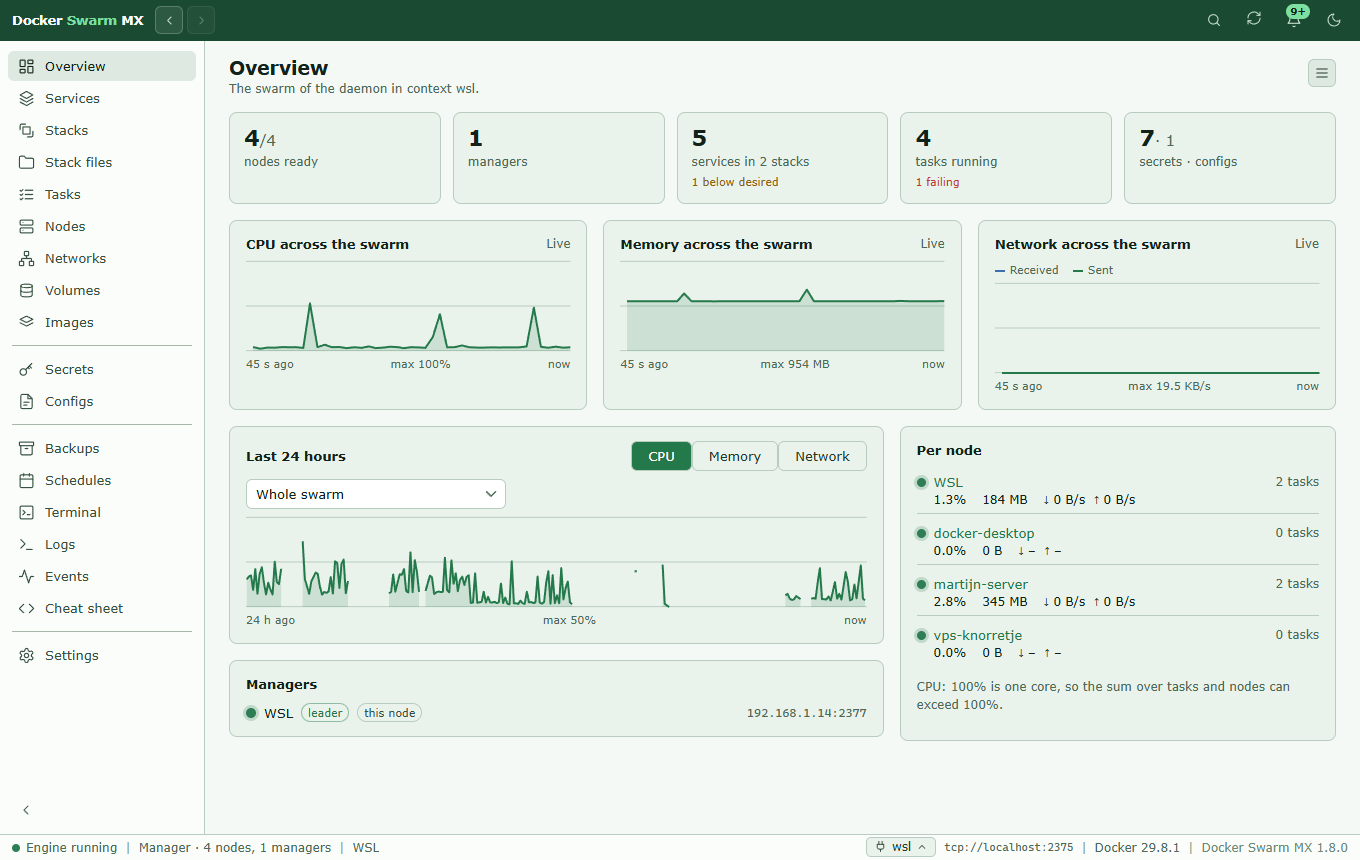
Nodes, managers, services and tasks in one row, and the load of the whole swarm, live and over 24 hours, measured on every node.
Services →
Grouped per stack. Roll out a new image pinned to its digest, roll back, scale, redeploy, replace a hanging task, and rebalance.
Logs & events →
All services or a choice, interleaved by time, with regex search; two weeks of swarm events, and an audit log of the app.
Nodes →
Drain with a preview of what moves, quorum warnings, capacity, disk space, and the images on every node, pulled again or removed.
Stacks →
Deploy from a compose file with its .env, compare a stack with its file, and edit the files with Docker checking them first.
Secrets & networks →
Create them, see who uses them, and replace the content of one in a single step: the swarm itself does not allow that.
Backups & volumes →
The swarm as a zip and a volume on its node, on a schedule, to a folder, SFTP or S3, encrypted with age. A restore you tick.
Schedules →
Everything the app does by itself in one table, and image updates at a fixed time that only roll out what changed.
Notifications →
Gotify, ntfy, a webhook or Windows, when a node goes down or an update rolls back. Once per problem, and when it is resolved.
Terminal →
A root shell on any node through its Docker context, no SSH needed, and a cheat sheet that puts a command on the prompt.
Swarm setup →
Create a swarm, join or leave one, unlock a manager, and the join tokens, autolock, heartbeat and task history.
Contexts & looks →
Your Docker CLI contexts, one per node for the work on that node. Five colour schemes, seven languages, and it updates itself.
All 118 things it does, on one list.
Every feature page, boiled down to one line per thing it can do. Each line opens its tile on that page, with the whole story.
118 things on 12 pages.
- Counts of nodes, managers, services, tasks, secrets and configs
- CPU, memory and network of the swarm, a node or a service
- The load measured every minute, also with the window closed
- The managers, the leader, and whether each one is reachable
- Tasks on a node that is down are not counted as running
- Engine, swarm role, host, Docker version and app version in the status bar
- Services per stack, with running and desired, update state and ports
- New service: replicated, global or a job, with all its settings
- Roll out a new image, pinned to its digest, in batches you set
- Roll back to the previous settings, including the previous image
- Redeploy all tasks one by one, and scale the replicas
- Networks, mounts, limits, health check and more, in four tabs
- Private images, with the login from docker login on this computer
- Tasks with their history, logs, what it uses, and the inspect JSON
- A diagnosis of a service that does not run, to read and copy
- Claude at a service, with your own Anthropic API key
- All tasks by node and service, the failing ones standing out
- Replace a task that hangs, like docker rm -f on its own node
- Rebalance a service over the nodes, replacing only the surplus
- The logs of one service, a stack or all services, on one page
- Only the tasks of services; standalone containers stay out
- Search with words, !word, "a phrase" or a /regular expression/
- Only errors or warnings, recognised from the usual log formats
- The logs of all tasks of a service, merged by time
- The logs of all services of a stack in one view
- The last 100 to 5000 lines, a filter, and following live
- Logs read on their own node when the log broker stalls
- Messages from the daemon itself, above the lines
- Events of services, nodes, secrets, configs and swarm networks
- Per event what changed: a new image, replicas, a rollout
- Two weeks of events, where a manager keeps only its last 256
- Filter events by kind, by period and by name or stack
- An audit log of every change the app makes, with the Windows user
- Secrets in the audit log only by name, tokens and keys left out
- Search the audit log, filter by action and result, export to CSV
- Role, leader, availability, state, address, engine, tasks, labels
- The CPUs and memory of a node next to what its tasks reserve
- How full the Docker disk of every node is, and what takes the room
- Clean up one node or all nodes: containers, images, build cache
- The images on every node, with the services and tasks that use them
- Per image on which nodes it is, and whether the digest differs
- Pull an image again on one node, all nodes or a choice of them
- Remove images that no container uses, several at once
- Drain a node, with a preview of what moves, stops or is stuck
- Pause a node: its tasks keep running, it gets no new ones
- Promote and demote, with warnings about the quorum
- Node labels for placement constraints
- Add a node through its Docker context, the join token out of view
- Remove a node that is down
- When Docker does not start: look on the host, and repair
- A stack compared with its compose file: images, replicas, mode
- The services, tasks, logs, what it uses, and the file of a stack
- Deploy with docker stack deploy --with-registry-auth, output live
- Before deploying: what changes, the ports, and what stands out
- Single replicas and updates that do not roll back, pointed out
- Windows folders in bind mounts become /mnt/c/… on deploy
- The .env next to the compose file fills in ${VAR} on deploy
- Remove a stack with its networks, secrets and configs
- One folder per stack with its compose file, .env and other files
- Edit in the app; docker stack config reads the file before saving
- Create a secret or config from text or a file
- Which services use each secret and config
- Replace a secret: name-v2, every service switched, the old one gone
- Remove a secret or config that no service uses
- Removing services cleans up the networks, configs and secrets left
- Overlay networks with their stack, subnet and the services that use them
- Create an overlay network: attachable, internal or encrypted
- Remove a network that no service uses
- The swarm definition as a zip: services, networks, configs, labels
- A volume on its own node as a .tar.gz
- Pause the containers of a database while its volume is copied
- By hand, or daily or weekly at a set time, keeping the last n
- To a folder, an SFTP server or NAS, or an S3-compatible bucket
- Encrypted with age and one backup password, stored with DPAPI
- Restore a swarm backup: only what is missing, only what you tick
- Restore a volume backup over the files in the volume
- The volumes of every node, with size, stack and who uses them
- Remove a volume that no container uses, on its own node
- Every scheduled task with where, when, last run and next run
- Filter by kind and status, and hide the tasks of the app
- Run a task now, pause, resume, change or remove it
- New images daily or weekly, for a service or a whole stack
- Images pinned to only a digest are left alone
- A notification when a scheduled update fails or rolls back
- Node or manager down, no leader, a rollback, a full disk
- Optionally also drains, roles, and nodes or services added or gone
- Gotify, ntfy, a webhook or a Windows notification
- One message per problem after a waiting time, one when resolved
- Quiet hours at night, ending with a summary
- The latest notifications behind the bell, cleared with one click
- Watching from the notification area, and starting with Windows
- A root shell on any node the app reaches through a context
- No SSH session needed, and docker works in the shell too
- A shell in the container of a running task, like docker exec -it
- The Docker commands for a swarm, per topic, with examples
- Copy a command, or put it on the prompt; you press Enter
- Stand-alone containers, compose projects and the rest through the Terminal
- Create a swarm, with suggestions for the address
- Join through a manager the app knows, or paste the join command
- Unlock a locked manager
- Leave a swarm; a manager demotes itself first
- Show, copy and renew join tokens, or copy the join command
- Autolock, with the unlock key
- The heartbeat and the task history limit
- How long certificates are valid, and rotating the CA
- After a lost quorum, a new cluster from a manager that still answers
- For WSL with mirrored networking: are the ports let through?
- Connects through Docker CLI contexts or DOCKER_HOST
- A context per node for its load, Terminal, backups and logs
- Switch contexts from the status bar
- Backup destinations and the backup password, next to the contexts
- Five colour schemes, each light and dark
- English, Dutch, French, Spanish, Italian, Portuguese and Chinese
- The sidebar on the left or the right, folding to icons
- A command palette: open anything, act on it, or type a command
- Updates itself from Codeberg, checked every four hours
- Its data in %APPDATA%, tokens and passwords encrypted with DPAPI
- A log of the app, and a support bundle to send with a problem
Before it changes anything
Draining a node? See what moves first.
A swarm does what you tell it, also when that leaves a database with nowhere to go. So before a risky change the app shows what it will do: which tasks move to another node, which stop, and which cannot run anywhere else because of their placement constraints or host-mode ports. Then you decide.
Up and running in a minute.
One installer for Windows. It finds your Docker contexts and puts nothing on the swarm.
Installer
Docker-Swarm-MX-Setup.exe installs for the whole machine and fetches the WebView2 runtime when Windows does not have it yet. It is not signed yet, so SmartScreen warns the first time: More info → Run anyway. After that the app keeps itself up to date.
From source
Go 1.26, Node.js 20+ and the Wails v3 CLI, with docker-api-go cloned next to the project. NSIS 3 for the installer.
$ git clone https://codeberg.org/MartijnSchimmel/docker-api-go.git
$ git clone https://codeberg.org/MartijnSchimmel/docker-swarm-mx.git
$ cd docker-swarm-mx
$ wails3 dev
Server mode
The same app without a window, with the UI on localhost:34115. Handy for a look at the UI in a browser; it leaves out the notification area, Windows notifications and starting with Windows.
$ wails3 task build:server